
Smishing vs Email Phishing: Two Delivery Methods, Different Dangers
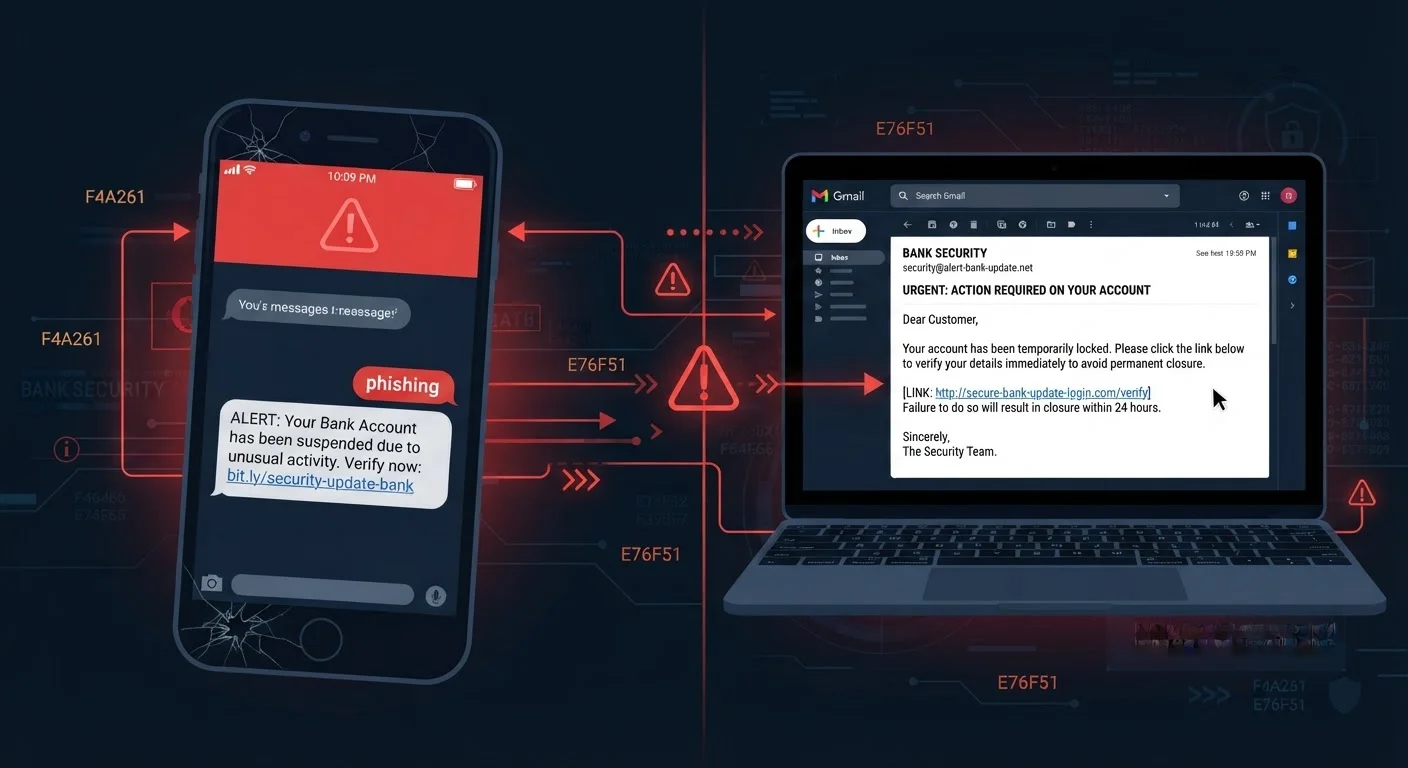
Photo credit: GadgetLite.net | All Things Tech
In this article
SMS phishing and email phishing share the same goal but work differently. Here's how to defend against each one.
Key Takeaways
- Smishing uses SMS texts to create urgency; email phishing relies on volume and visual mimicry.
- Text messages have a much higher open rate than emails, making smishing harder to ignore.
- Email phishing often carries attachments or links designed to install malware or harvest credentials.
- Both methods use social engineering - manipulating emotions rather than breaking technical defenses.
- Never tap or click unsolicited links; verify requests through official channels instead.
- Using an authenticator app instead of SMS codes adds a meaningful layer of protection.
What Each Attack Actually Is
Smishing is phishing delivered via SMS text message. The word blends "SMS" and "phishing." Attackers send a text - often impersonating your bank, a package carrier, or a government agency - urging you to tap a link or call a number immediately. The message exploits the personal, always-visible nature of your phone.
Email phishing is the longer-established cousin: fraudulent emails designed to look like they come from a trusted source. Attackers may replicate a company's branding, spoof a sender address, or attach a file that installs malicious software when opened.
Both are forms of social engineering - manipulation that targets human psychology rather than software vulnerabilities. For a broader foundation, see our complete guide to phishing attacks.
| Criterion | Smishing | Email Phishing |
|---|---|---|
| Delivery channel | SMS text message | Email inbox |
| Typical open rate | Over 90% | 20-30% |
| Common lure | Package alerts, bank fraud notices | Invoice, password reset, account alerts |
| Link disguise method | Shortened URLs hiding destination | Typosquatted domains, hyperlinked text |
| Malware delivery | Less common, but possible via links | Common via attachments or links |
| Scale of campaign | Targeted or moderate volume | Often millions of addresses |
| Primary psychological lever | Urgency and personal familiarity | Authority and brand trust |
Why Each Method Lands Differently
The channel shapes the danger. Text messages carry an average open rate well above 90%, compared to roughly 20-30% for marketing emails - and scam messages benefit from that same habit. When a text arrives, most people read it within minutes, often on a small screen where shortened URLs hide their true destination.
Email phishing compensates with scale and visual polish. A single campaign can target millions of addresses. Attackers invest in cloned logos, matching fonts, and domains that differ by one character (called typosquatting) to make the message look legitimate at a glance.
98%
SMS messages opened within 3 minutes
Industry messaging research consistently finds SMS open rates far exceed email, with most texts read almost immediately after receipt.
3.4B
Phishing emails sent daily (estimated)
Security researchers estimate billions of phishing emails are sent every day, making it one of the most common vectors for account compromise.
1 in 5
Adults who report receiving a smishing text
Consumer surveys in the US suggest a significant share of smartphone users encounter at least one suspicious text message each month.
Smishing messages tend to be shorter and blunter - "Your account is locked. Verify now: " - while phishing emails can run paragraphs, complete with fake invoice numbers and "customer service" sign-offs. Both lean on urgency and fear to short-circuit careful thinking. Learn what actually happens the moment you click a suspicious link to understand the downstream risk.
Red Flags Specific to Each Channel
Smishing red flags
- Unknown or spoofed number, sometimes showing a 10-digit US number you don't recognize
- Unexpected package, prize, or account-alert claims demanding immediate action
- Shortened URLs (like bit.ly links) that obscure the real destination
- Requests to call a number embedded in the message rather than one on the official website
Email phishing red flags
- Sender address that doesn't match the brand's real domain (e.g., support@paypa1.com)
- Generic greetings like "Dear Customer" instead of your name
- Unexpected attachments - especially .zip, .docx, or .exe files
- Hover-over links that reveal a URL unrelated to the supposed sender
- Pressure language: "Your account will be closed in 24 hours"
Not all phishing is equal in targeting either - spear phishing vs. bulk phishing explains the difference between mass campaigns and personalized attacks.
How to Defend Yourself Against Both
The core habit is the same regardless of channel: pause before you act. Urgency is the attacker's most reliable tool. A few concrete steps close most of the risk:
- Never tap or click links in unexpected texts or emails. Go directly to the official website by typing the address yourself, or call the number on the back of your card.
- Verify the sender independently. If your bank texts you, hang up or close the message and call the number on your card or their verified website.
- Enable multi-factor authentication (MFA) on important accounts. Even if an attacker captures your password, MFA adds a second barrier. Note that SMS-based codes can be intercepted - authenticator apps offer stronger protection.
- Report suspicious messages. Forward smishing texts to 7726 (SPAM) and report phishing emails to your email provider and the FTC at reportfraud.ftc.gov.
Building small, consistent habits is the most reliable defense. Our article on everyday habits that reduce phishing risk offers practical routines you can start immediately.
A Note on SMS Two-Factor Codes
If an attacker is actively smishing you, they may also be attempting to intercept SMS verification codes sent by your accounts. This is one reason security experts suggest moving away from SMS-based two-factor authentication where possible. Authenticator apps generate codes locally on your device and are not vulnerable to SMS interception in the same way.

Author
Cyber Security Editorial Team
Cyber Security Editorial Team is the collective byline for our editorial team and contributor network. Articles published under this byline or an editorial pen name are researched, written, and reviewed according to our editorial standards for clarity, consistency, and independence before publication.
View all articles →