
Consumer Electronics Decoded: What All Those Specs Actually Mean
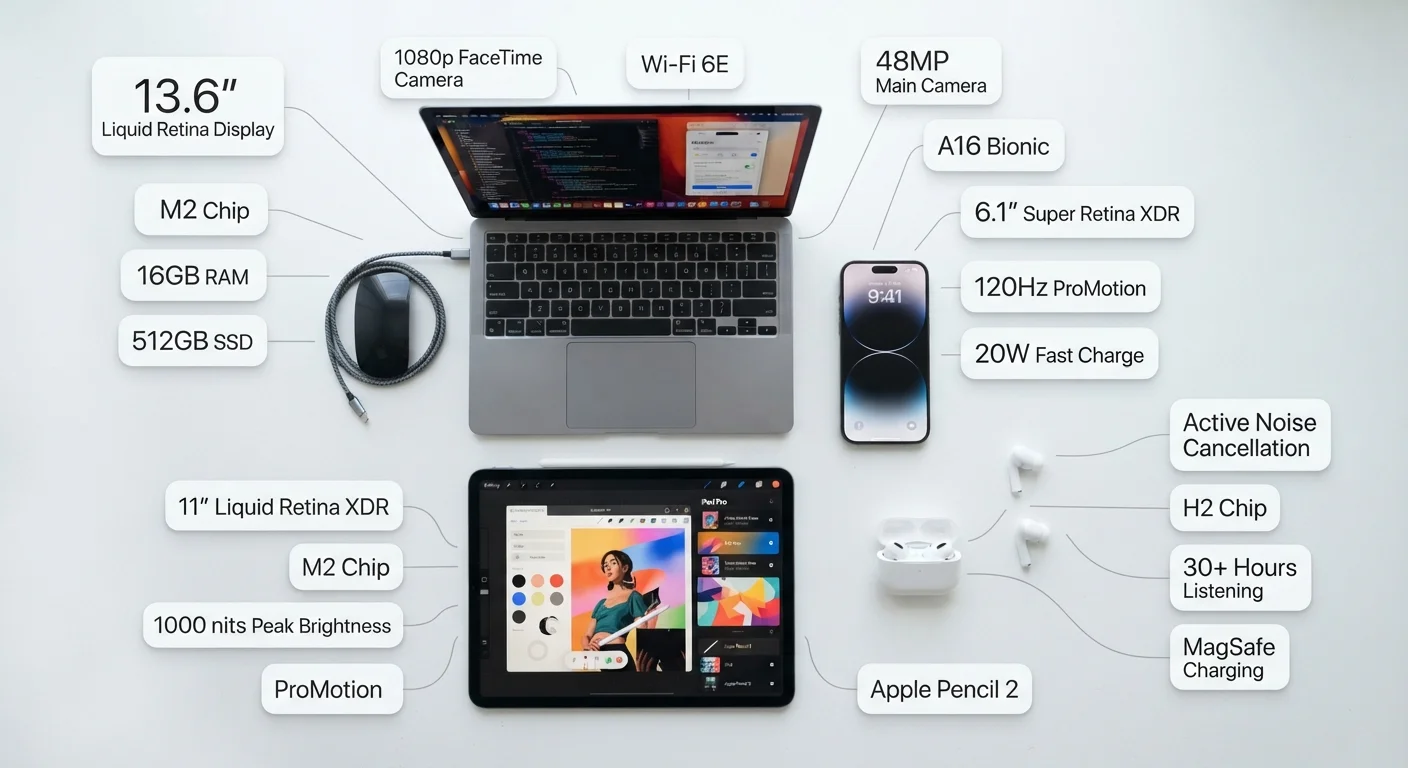
Photo credit: GadgetLite.net | All Things Tech
In this article
RAM, refresh rate, nits, Hz — demystified. Learn what the most common consumer electronics specs mean before you make your next decision.
Key Takeaways
- RAM determines how many tasks a device handles at once, not how fast it runs overall.
- Screen refresh rate (Hz) affects visual smoothness, especially noticeable during scrolling and gaming.
- Nits measure screen brightness — higher values matter most in bright outdoor conditions.
- Battery capacity in mAh tells you potential endurance, but real-world life depends on software efficiency.
- Storage type (SSD vs. HDD) affects speed more than storage size alone.
Why Spec Sheets Feel Confusing (And Why They Don't Have To)
Walk into any electronics section — physical or virtual — and you'll face a wall of numbers: 8GB RAM, 120Hz, 5000mAh, 2TB SSD. Manufacturers pack these figures onto product pages assuming you'll understand them, but most people have never been taught what they mean in practical terms.
Here's the truth: you don't need to memorize every acronym. You just need a working map of what each category of spec actually controls in day-to-day use. This guide covers the specs that appear most often across phones, tablets, laptops, and televisions — and explains what they mean for the experience in your hands. For a broader reference, see the Consumer Electronics Glossary covering 50 common terms.
120Hz
Refresh rate now common on mid-range phones
Displays once reserved for flagship devices now appear across a wide range of price points, per industry analyst reports tracking panel adoption trends.
6–8GB
RAM typical in mainstream smartphones
Market data from device specification databases shows this range as the current standard across most mid-tier Android and iOS-compatible devices.
1,000+ nits
Peak brightness threshold for outdoor readability
Display testing organizations generally cite 1,000 nits as the practical minimum for comfortable outdoor viewing in direct sunlight.
Display Specs: Hz, Nits, and Resolution Explained
The display is the most visible part of any screen-based device, and its specs directly shape what you see every day.
- Resolution (e.g., 1080p, 4K) describes how many pixels make up the image. More pixels generally means sharper detail, though the benefit depends on how close you sit to the screen.
- Refresh rate (Hz) measures how many times per second the screen redraws its image. A 60Hz screen refreshes 60 times per second; a 120Hz screen does it twice as often, producing noticeably smoother scrolling and motion.
- Brightness (nits) determines how visible the screen is in different lighting. Devices intended for outdoor use typically advertise peak brightness above 1,000 nits.
- Panel type (OLED, IPS LCD, AMOLED) affects color accuracy, contrast, and power consumption — OLED panels produce true blacks by turning off individual pixels entirely.
Display specs matter most for phones, tablets, and televisions. For a deeper look at how these apply to smartphones and tablets, the specs above are among the first worth comparing.
Match Display Specs to How You'll Use It
If you primarily use your phone indoors, peak brightness above 800 nits offers diminishing returns. Focus instead on color accuracy and refresh rate for smoother everyday scrolling. Reserve the high-nit comparisons for devices you plan to use outdoors regularly.
Performance Specs: RAM, Processor, and Storage
Performance specs determine how a device handles tasks — everything from opening an app to running demanding software.
- RAM is short-term memory. It holds whatever you're actively doing. Phones with 6–8GB of RAM can juggle a browser, messaging apps, and music simultaneously without dropping performance. Laptops typically benefit from 16GB for comfortable multitasking.
- Processor (CPU/chip) is the brain. Clock speed (measured in GHz) and core count affect how fast tasks are processed. Chip architecture matters too — newer generations often outperform older ones even at lower clock speeds.
- Storage is where your files, photos, and apps live permanently. SSDs (solid-state drives) are much faster than older HDDs for loading apps and booting the system. Capacity (GB/TB) tells you how much you can store.
For a focused breakdown of how these three numbers shape the everyday PC experience, the RAM, storage, and speed guide goes deeper into each metric.
Battery and Connectivity Specs Worth Understanding
Two more categories appear on nearly every spec sheet and are worth a few minutes of your time.
Battery capacity (mAh) measures how much charge a battery can hold. A higher mAh number generally suggests longer endurance, but software optimization and screen brightness play a significant role in real-world life. A device with a large battery but an inefficient processor may not outlast a smaller, well-optimized competitor.
Charging speed (watts) tells you how quickly the device can recharge. A 65W charger refills a laptop battery much faster than a 20W charger — though charging speeds can be limited by the cable and adapter you use.
Connectivity specs — Wi-Fi 6, Bluetooth 5.3, 5G — describe which wireless standards the device supports. Newer versions generally offer faster speeds, greater range, or lower power draw, but you'll only see the benefit if your router or other devices also support the same standard.
Once you're comfortable reading specs independently, the PC spec sheet guide walks through a real product listing line by line. For a wider view of how all of this fits together, the complete consumer electronics guide covers displays, audio, connectivity, and software in one place.
Specs Reflect Lab Conditions, Not Daily Life
Battery life estimates, charging speeds, and network throughput are measured under controlled test conditions. Real-world results vary based on your habits, location, carrier infrastructure, and how many background apps are running. Use spec numbers as a comparison tool rather than a precise performance guarantee.
Frequently Asked Questions

Author
Electronics Editorial Team
Electronics Editorial Team is the collective byline for our editorial team and contributor network. Articles published under this byline or an editorial pen name are researched, written, and reviewed according to our editorial standards for clarity, consistency, and independence before publication.
View all articles →