
Privacy Labels vs. App Store Ratings: Which Should You Trust?
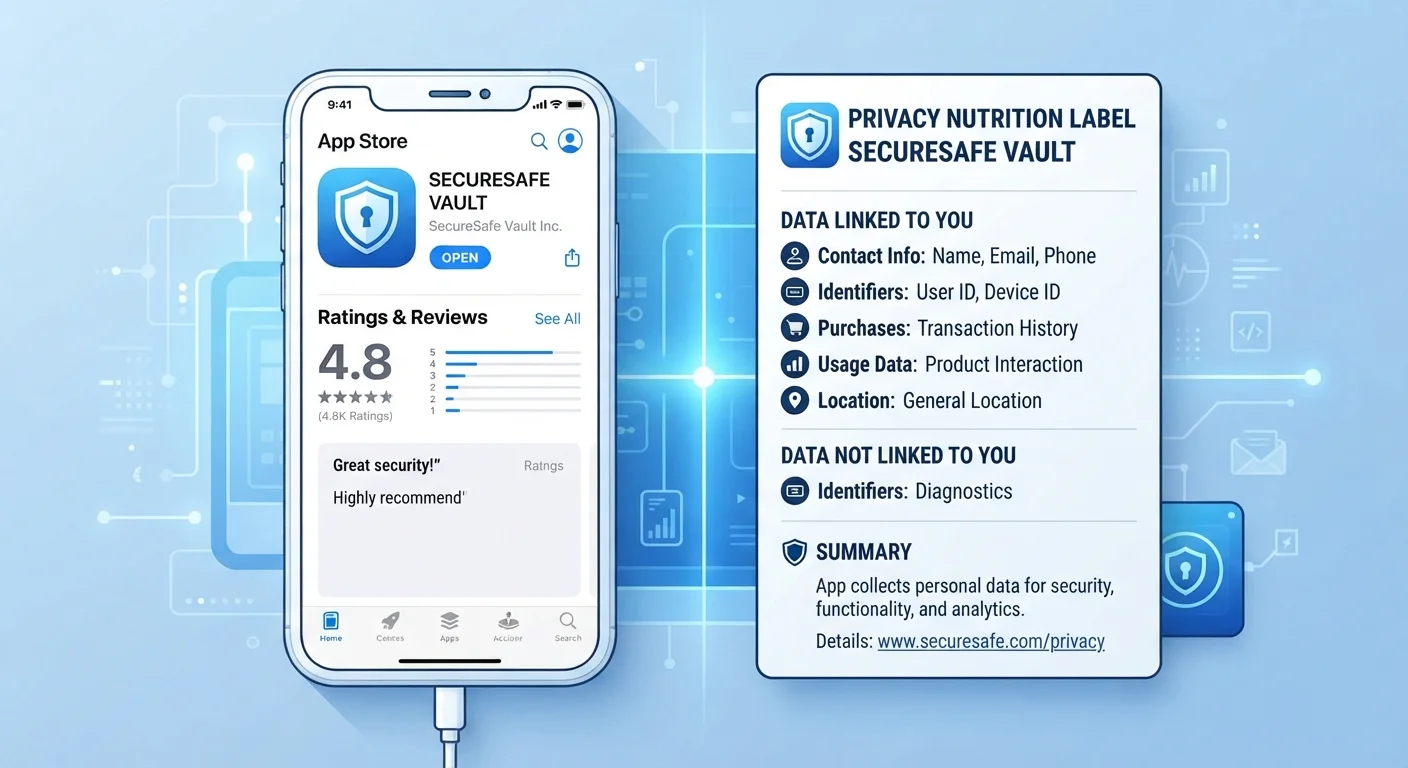
Photo credit: GadgetLite.net | All Things Tech
In this article
App privacy labels and star ratings tell very different stories. Learn what each actually measures and how to use both wisely.
Key Takeaways
- Privacy labels describe what data an app collects; star ratings reflect how much users enjoy it.
- A five-star app can still collect and share extensive personal data with third parties.
- Privacy labels are self-reported by developers and are not independently verified by Apple or Google.
- Star ratings can be gamed through incentivized reviews and are not a measure of safety.
- Using both signals together - alongside permissions checks - gives you a more complete picture.
- Neither metric alone is enough to make a fully informed decision about an app's trustworthiness.
What Each Signal Actually Measures
When you land on an app's store page, two numbers compete for your attention: the star rating and, if you scroll down, the privacy label. They look equally authoritative, but they measure completely different things.
App Store Privacy Labels - introduced by Apple in 2020 and expanded on Google Play as the Data Safety section in 2022 - are structured disclosures that describe the categories of data an app collects. Think of them like nutrition labels for your personal information. They're organized into buckets such as "data used to track you," "data linked to you," and "data not linked to you." For a plain-language explanation of those terms, see our app data terminology glossary.
Star ratings, on the other hand, are aggregated scores from user reviews. They measure satisfaction - did the app do what the user expected, crash less than rivals, or update responsibly? They say nothing about data handling.
| Criterion | Privacy Labels | Star Ratings |
|---|---|---|
| What it measures | Data collection and sharing practices | User satisfaction and app quality |
| Who provides the information | Developer (self-reported) | General users (crowd-sourced) |
| Independently verified? | No - policy-based, not audited | No - subject to manipulation |
| Tells you about privacy risk? | Yes - directly | No - not at all |
| Tells you if the app works well? | No | Yes - with caveats |
| Available on | Apple App Store & Google Play | Apple App Store & Google Play |
The Reliability Problem with Each
Neither metric is airtight, and understanding why matters before you rely on either one.
Privacy labels are self-reported. Developers fill in their own disclosures, and neither Apple nor Google independently audits every submission for accuracy. Research from academic institutions has found discrepancies between what some labels claim and what apps actually do - though both platforms have policies that can penalize inaccurate filings. The label gives you a starting point, not a guarantee.
Star ratings are crowd-sourced and gameable. Apps have historically used in-app prompts timed to moments of delight (right after you win a game level, for example) to solicit positive reviews. Some developers have used incentivized rating campaigns. Ratings also skew toward engaged, loyal users - people who quietly uninstalled in frustration rarely leave reviews. A 4.8-star rating tells you satisfied users exist; it doesn't tell you about the ones who left.
A High Rating Doesn't Mean a Safe App
Some of the most widely downloaded apps carry both excellent star ratings and extensive data collection disclosures. Popularity signals that many people find an app useful - it says nothing about how that app handles the personal data it gathers. These are genuinely separate questions and deserve separate evaluation.
The practical upshot: treat both as signals worth considering, not verdicts worth trusting blindly. Layer them with a quick permissions check - what app permissions actually mean walks through exactly what to look for.
How to Read Them Together - Practically
The most useful approach is to use both signals in sequence, not as alternatives.
- Check the privacy label first. Look specifically at the "Data Used to Track You" row. If an app collects location, browsing history, or purchase history for advertising, decide whether that trade-off makes sense for you. Our article on privacy trade-offs can help you think through that exchange.
- Scan recent written reviews. Sort by most recent, not most helpful. Look for patterns: repeated complaints about unexpected charges, aggressive data requests, or sudden behavior changes after an update are meaningful signals.
- Review the permissions at install time. The label tells you what data is collected; the permission prompt tells you what the app is asking your device to share. If a flashlight app requests your contacts, that mismatch is a red flag regardless of its star rating.
For a deeper walkthrough of settings to adjust after installation, see app privacy settings you should review. And if a developer's privacy label raises questions, the app's full privacy policy - daunting as it looks - often clarifies what's actually shared with third parties. Our guide on reading a privacy policy without losing your mind shows which sections matter most.
80%+
Apps requesting at least one sensitive permission
Analysis of popular app stores has consistently found the large majority of top apps request access to at least one sensitive data category such as location or contacts.
~40%
iOS apps with data-tracking disclosures in their labels
Studies examining Apple App Store privacy labels have found a substantial share of apps disclose some form of cross-app tracking in their privacy nutrition labels.

Author
Apps & Software Editorial Team
Apps & Software Editorial Team is the collective byline for our editorial team and contributor network. Articles published under this byline or an editorial pen name are researched, written, and reviewed according to our editorial standards for clarity, consistency, and independence before publication.
View all articles →