
Gaming Controllers Explained: What All Those Buttons and Features Actually Do
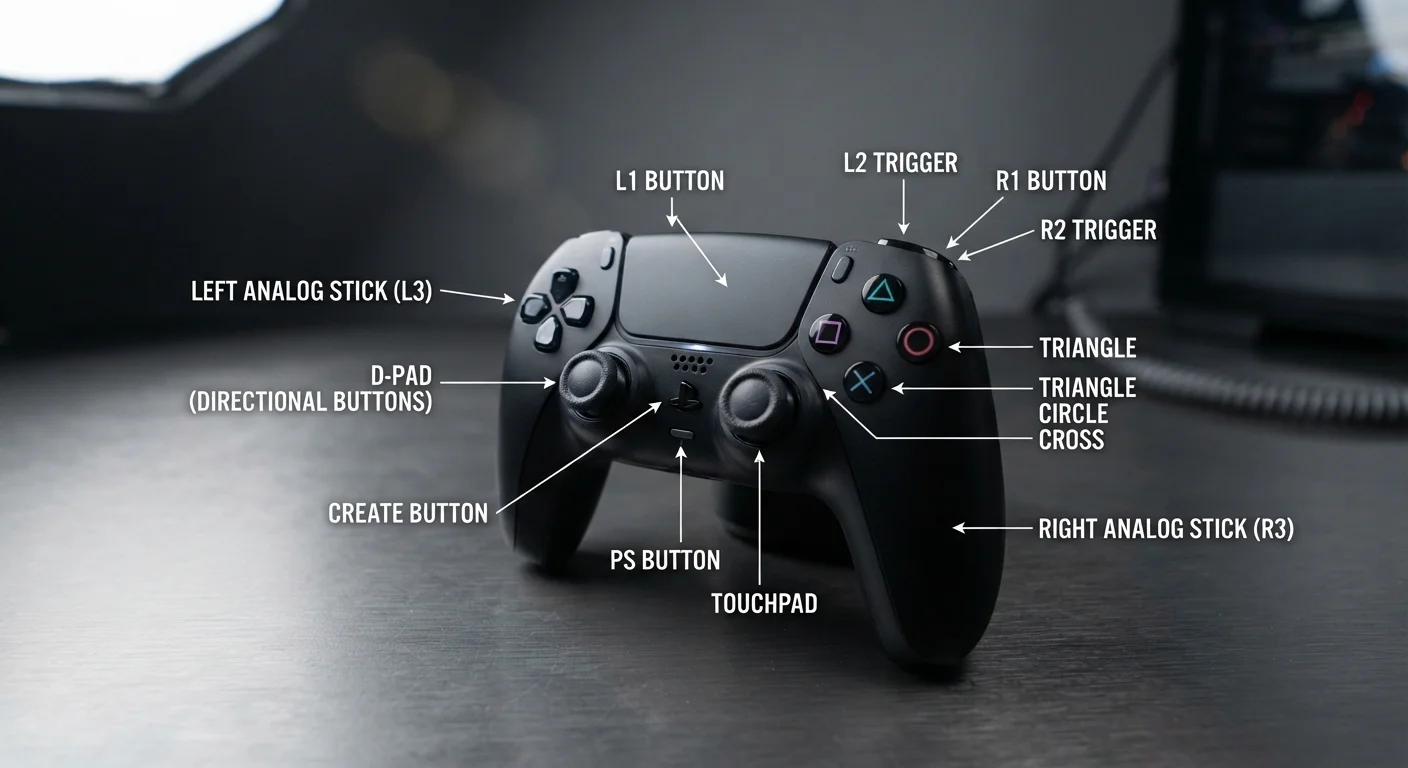
Photo credit: GadgetLite.net | All Things Tech
In this article
Analog sticks, triggers, rumble motors — learn what every part of a gaming controller does and why it matters for your play.
Key Takeaways
- Analog sticks report a full range of directional pressure, not just on/off signals.
- Triggers are analog too — they measure how far you press them, which games use for nuanced control.
- Haptic feedback (rumble) is built into most modern controllers to make game events feel physical.
- Shoulder buttons (bumpers) differ from triggers — they're digital clicks, not pressure-sensitive.
- Extra features like gyroscopes and touchpads expand what a controller can do beyond buttons alone.
- Understanding your controller's capabilities helps you pick the right settings and play style.
The Core Layout: What You're Actually Holding
Pick up almost any modern controller and the layout follows a familiar pattern: two analog sticks, a cluster of four face buttons, a D-pad, two triggers, two shoulder bumpers, and a handful of system buttons in the middle. That layout didn't happen by accident — it evolved over decades of ergonomic refinement and player feedback.
The face buttons (labeled with letters, numbers, or symbols depending on the platform) handle the most common in-game actions: jumping, interacting, attacking, or confirming menu choices. They're digital inputs — pressed or not pressed — so response is instant. The D-pad, the cross-shaped disc on the left side, works the same way and excels at quick directional commands in menus or 2D games.
Understanding the full ecosystem of gaming accessories starts right here, with the controller itself as your primary tool.
~1990s
Era analog sticks became standard on home controllers
The Nintendo 64 controller (1996) and Sony DualShock (1997) popularized analog sticks on home consoles, permanently changing how 3D games were designed.
360°
Full directional range of an analog stick
Unlike a D-pad's eight fixed directions, analog sticks report position across the full circle with variable intensity — enabling smooth, graduated movement in any direction.
2
Separate rumble motors in a traditional controller
Classic rumble controllers use one heavy motor for low-frequency vibration and one lighter motor for rapid, high-frequency buzz — creating a range of tactile sensations.
Analog Sticks and Triggers: The Nuance Makers
Here's where controllers get genuinely clever. Analog sticks don't just say "move left" — they report exactly how far left, using a tiny sensor that reads position across a circular range. Push the stick halfway and your character walks; push it all the way and they run. This continuous measurement is what makes smooth 3D movement and camera control possible.
Triggers use the same principle but along a single axis. The further you squeeze, the higher the value sent to the game. Racing games use this for throttle and braking; shooters often use a light pull to aim and a full press to fire. Some next-generation controllers add physical resistance to triggers — called adaptive triggers — so a bowstring or car brake literally pushes back against your finger.
Check Your Game's Controller Settings
Before assuming a control scheme feels off, dive into the settings menu. Most modern games offer dead zone sliders, trigger sensitivity options, and full button remapping. Adjusting the stick dead zone alone can make aiming or driving feel dramatically more responsive without buying any new hardware.
Haptic Feedback, Gyroscopes, and Hidden Features
Rumble motors have been a standard controller feature since the late 1990s. Traditional rumble uses two small eccentric motors spinning at different speeds to create vibrations — one low and rumbly, one quick and sharp. Modern haptic systems replace these with actuators that can reproduce a much wider range of sensations, from the patter of rain to the crunch of gravel underfoot.
Many controllers also include a gyroscope and accelerometer — motion sensors that detect how you're physically tilting or rotating the device. Games can use this for steering, aiming fine-tuning, or motion-based puzzles. Some platforms, like the Nintendo Switch, lean heavily into gyro aiming as a precision tool.
Touchpads, found on PlayStation controllers, function like a small trackpad and can be tapped, swiped, or used as an additional button depending on how a game maps them. These features expand what a controller can do well beyond its button count — and they connect directly to how different genres use your input. Check out how major gaming genres work to see how genre shapes which controller features matter most.
Knowing Your Controller Makes You a Smarter Player
You don't need to be a hardware engineer to get more out of your controller — but knowing what each part actually does helps you tweak settings intelligently. Many games let you adjust stick dead zones (the area of movement the stick ignores before registering input), trigger sensitivity curves, and button remapping. These aren't just pro-player tweaks; they're genuine comfort and accessibility tools.
If you're curious about how controllers stack up against other input methods, our controller vs. mouse-and-keyboard comparison walks through which setup suits which type of play. And for a broader look at gear vocabulary, the gaming peripheral glossary is a handy reference whenever a spec term throws you off.
Controllers are surprisingly sophisticated devices — and once you understand what all those inputs do, you can start making deliberate choices about how you play rather than just reacting to what's on screen.
“The controller is the grammar of gaming — once you understand how it communicates, everything else in the experience starts to make more sense.”
— Gaming Editorial Team, Editorial perspective on gaming hardware literacy
Frequently Asked Questions

Author
Gaming Editorial Team
Gaming Editorial Team is the collective byline for our editorial team and contributor network. Articles published under this byline or an editorial pen name are researched, written, and reviewed according to our editorial standards for clarity, consistency, and independence before publication.
View all articles →