
Mesh Wi-Fi vs. Traditional Router: How Each Handles a Modern Home
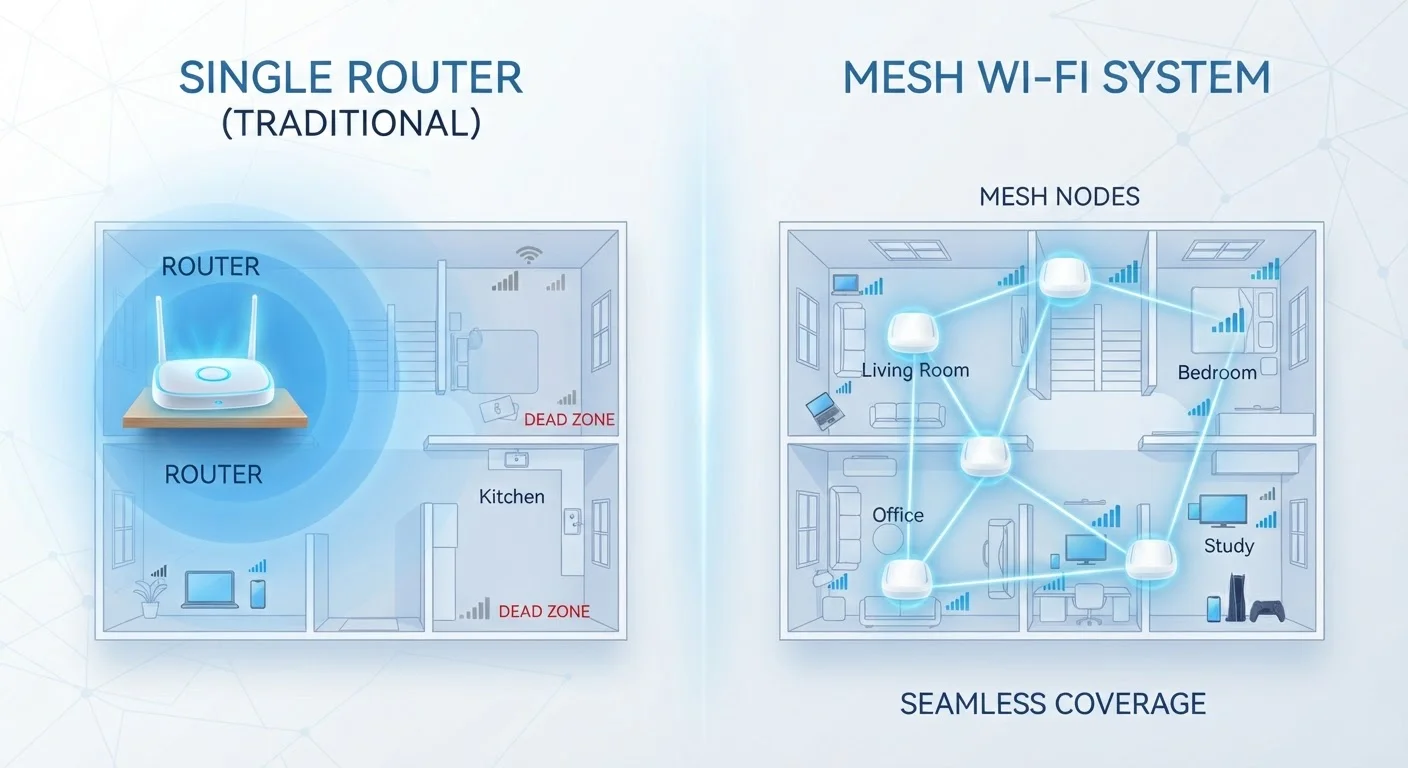
Photo credit: GadgetLite.net | All Things Tech
In this article
A single router works for some homes; a mesh system suits others. Understand the structural differences before deciding which approach to take.
Key Takeaways
- A traditional router broadcasts from a single point; a mesh system uses multiple nodes to share coverage across a home.
- Mesh systems typically self-manage handoffs between nodes, reducing the dead zones common with single routers.
- Traditional routers are often simpler to configure and can perform well when centrally placed in smaller spaces.
- Mesh systems usually cost more upfront but can scale easily by adding nodes as your home or needs grow.
- Neither approach is universally superior — home size, layout, and device count are the deciding factors.
How Each System Actually Works
Understanding the structural difference between these two approaches makes the choice much clearer. To get grounded on the basics first, see how routers and modems actually function.
A traditional router acts as the sole signal source in your home. Your modem connects to the internet; the router broadcasts a Wi-Fi signal from that single location. The further a device gets from that point — or the more walls it passes through — the weaker the connection becomes.
A mesh Wi-Fi system replaces that single broadcast point with a network of two or more nodes. One node connects to your modem; the others are placed around the home and communicate with each other, often on a dedicated wireless channel called a backhaul. Devices connect to whichever node offers the strongest signal, and the system handles the transition automatically as you move through the home.
| Criterion | Traditional Router | Mesh Wi-Fi System |
|---|---|---|
| Coverage approach | Single broadcast point | Multiple distributed nodes |
| Ideal home size | Small to medium (under ~1,500 sq ft) | Medium to large (1,500 sq ft and up) |
| Dead zone risk | Higher in larger or complex layouts | Low when nodes are well placed |
| Typical upfront cost | $80–$200 | $150–$500+ |
| Setup complexity | Browser or app; moderate control | App-driven; simpler but less granular |
| Scalability | Limited; requires separate extenders | Easy; add nodes as needed |
| Device roaming | Manual or inconsistent handoff | Seamless automatic handoff |
| Best for many devices | Adequate for moderate counts | Designed for high device density |
Coverage, Performance, and Real-World Trade-Offs
For a compact home — a studio apartment or a small two-bedroom house — a centrally placed traditional router often delivers all the coverage you need. Placement matters enormously here: a router tucked in a corner cabinet will underperform one placed in an open, central location. For placement strategies that maximize a single router's reach, see the key decisions that shape your whole-home signal.
Larger homes — particularly those with multiple floors, thick concrete walls, or L-shaped layouts — are where a single router reliably struggles. Even a high-powered router has physical limits. Mesh systems address this by putting signal sources closer to every corner of the home, rather than trying to project a single beam farther.
One important nuance: not all mesh systems perform equally. Systems that use a wired backhaul (Ethernet cables connecting the nodes) deliver the most consistent speeds. Wireless backhaul systems are easier to install but dedicate some bandwidth to node-to-node communication, which can reduce the speed available to your devices. If you're also weighing other options for extending coverage, Wi-Fi extenders, powerline adapters, and access points each offer different trade-offs worth understanding.
25+
Average connected devices per US household
According to Deloitte's Digital Media Trends survey, the average US household connected more than 25 devices to home Wi-Fi networks as of recent years.
~30%
Signal strength loss through a standard interior wall
Wi-Fi signal can lose roughly 30% of its strength passing through a single drywall partition, with concrete and brick causing significantly greater attenuation.
2–3x
Coverage area increase with mesh vs. single router
A two-node mesh system can roughly double or triple the effective coverage footprint of a single router placed in the same home, depending on layout and node placement.
Band selection is another factor that applies to both setups. Both traditional routers and mesh systems typically broadcast on the 2.4 GHz and 5 GHz frequency bands — each suited to different scenarios. Understanding how these bands behave helps you get more from either system.
Setup, Cost, and Long-Term Management
Traditional routers are typically straightforward to configure: plug in, connect to your modem, set a network name and password via a browser-based interface, and you're largely done. Advanced settings — port forwarding, QoS (quality of service) prioritization, firewall rules — are available for those who want them but aren't required for everyday use.
Mesh systems have shifted toward app-driven setup, which most users find intuitive. The trade-off is that advanced configuration options are sometimes more limited or buried behind simplified interfaces. For households running a growing number of smart devices, planning a network that handles all your smart devices becomes increasingly relevant regardless of which system you choose.
Mesh Isn't a Cure-All for Slow Internet
A mesh system improves Wi-Fi coverage and in-home signal quality — it does not increase the speed of your internet plan from your ISP. If your subscribed speed is the bottleneck, no router or mesh upgrade will resolve that. Check your plan speed first before investing in new hardware. Many common assumptions about what causes slow Wi-Fi are also worth questioning — see home network myths that could be hurting your Wi-Fi.
On cost: a capable traditional router typically runs from around $80 to $200. Entry-level mesh kits (usually two or three nodes) generally start at $150 and can exceed $500 for premium tri-band systems. That gap narrows when you factor in that a mesh system replaces not just a router but also any extenders you might otherwise need. For a more direct look at how the two approaches compare in context, see mesh vs. single router: which actually suits your home.

Author
Gadgets Editorial Team
Gadgets Editorial Team is the collective byline for our editorial team and contributor network. Articles published under this byline or an editorial pen name are researched, written, and reviewed according to our editorial standards for clarity, consistency, and independence before publication.
View all articles →