
Wi-Fi Extenders, Powerline Adapters, and Access Points: Expanding Coverage Without the Confusion
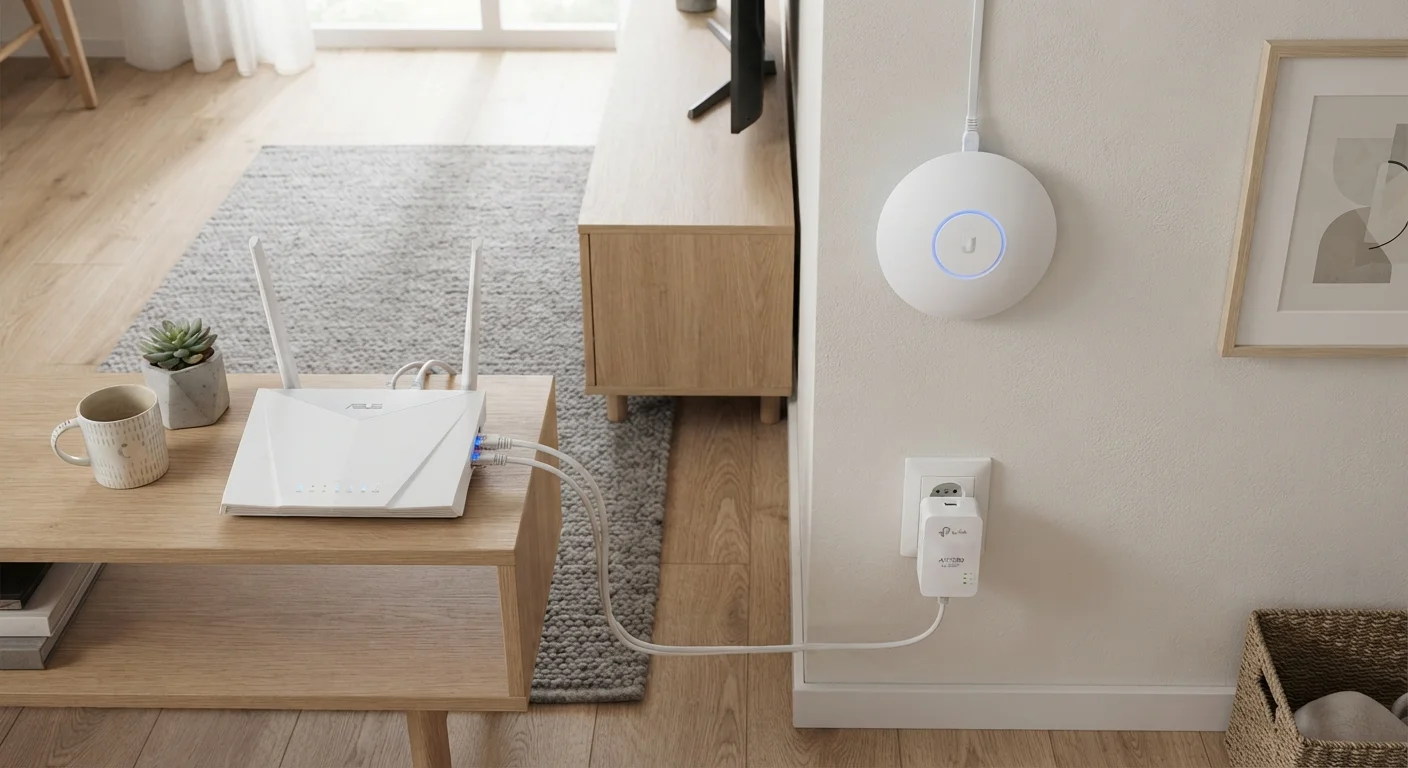
Photo credit: GadgetLite.net | All Things Tech
In this article
Three different technologies promise to fix weak Wi-Fi signals. Learn how each one works and which scenarios each is genuinely suited for.
Key Takeaways
- Wi-Fi extenders are easy to set up but can cut available bandwidth roughly in half on single-band models.
- Powerline adapters use your home's electrical wiring to carry a wired signal - no new cables required.
- Wired access points deliver the most reliable whole-home coverage but require running an Ethernet cable.
- Your home's layout, wall materials, and existing wiring largely determine which solution will actually work.
Why One Router Often Isn't Enough
Most home routers broadcast from a single point. Walls, floors, appliances, and sheer distance all absorb or scatter the signal before it reaches a far bedroom, a basement, or a backyard. The result is a dead zone - and a frustrated user.
Before grabbing any piece of hardware, it's worth ruling out simple fixes first. Router placement alone can transform coverage in many homes. See how placement decisions shape your whole-home signal for a deeper look at that step.
When placement genuinely isn't enough, you have three main hardware options: Wi-Fi extenders, powerline adapters, and wired access points. Each works differently, and each suits a different kind of home.
Wi-Fi Extenders: The Plug-and-Play Option
A Wi-Fi extender (sometimes called a repeater or booster) picks up your existing router's signal and rebroadcasts it. You plug it into a wall outlet roughly halfway between your router and the dead zone, and it creates a secondary coverage bubble.
What works well: Setup is usually straightforward - most models walk you through it in minutes. There's no drilling, no new cables, and no changes to your existing router.
What to watch for: A single-band extender has to receive and retransmit on the same frequency at the same time. That cuts the bandwidth available to connected devices - sometimes by as much as half. Dual-band extenders dedicate one band to the router link and another to devices, which helps, but the traffic still passes through an extra wireless hop. Speeds will be lower than what you get sitting next to the router.
Extenders Can Create Sticky Device Problems
Some devices - especially smartphones and smart home gadgets - latch onto the extender's network even when the main router's signal is stronger, leading to sluggish connections. If your devices don't roam automatically, you may need to manually switch networks as you move around the house. Check whether a model supports band steering or fast roaming (802.11r) if seamless handoff matters to you.
Also worth knowing: extenders typically create a separate network name (SSID), meaning your phone may not hand off automatically when you move rooms. Some newer models support seamless roaming, but it's worth checking before you buy.
Powerline Adapters: Using Wiring You Already Have
Powerline adapters take a completely different approach. You plug one adapter into a wall outlet near your router and connect it to the router with a short Ethernet cable. A second adapter plugs into any outlet in the room with poor coverage and provides a wired or wireless connection there.
The signal travels through your home's existing electrical wiring - no new cables, no drilling through walls.
What works well: Because the signal travels over copper wire rather than air, it's less affected by walls, furniture, and interference from neighboring networks. Speeds are generally more consistent than a Wi-Fi extender.
What to watch for: Performance varies significantly depending on the age and condition of your home's wiring. Outlets on different electrical circuits sometimes don't communicate well. Power strips and surge protectors can block the signal entirely - adapters should plug directly into wall outlets. Homes with older or mixed wiring may see unpredictable results.
Test Your Outlets Before Committing
If you're considering powerline adapters, try a simple test first: plug both adapters into outlets in the same room to confirm your electrical wiring supports the technology before moving one to the problem area. Many adapters include a pairing button and a signal-strength indicator light that tells you immediately whether the connection is usable. This takes about five minutes and can save you a return trip to the store.
Wired Access Points: The Most Reliable Path
A wired access point (AP) connects to your router via an Ethernet cable and broadcasts its own Wi-Fi signal from a new location - a hallway ceiling, a far room, or a garage. Devices connecting to the AP get a clean, full-speed signal because the backhaul (the link back to the router) is wired, not wireless.
What works well: This is the most reliable approach for consistent coverage across a larger space. It's also how professional network installers typically design whole-home Wi-Fi. Many access points support seamless roaming, so your devices switch connections without dropping.
What to watch for: You need to run an Ethernet cable from your router to wherever the AP lives. In many homes, that means threading cable through walls or ceilings - manageable in some situations, a real project in others. It's the option that requires the most upfront effort but tends to pay off long term.
If you're weighing a full whole-home overhaul, it's also worth comparing this approach against mesh systems. Mesh Wi-Fi and traditional routers handle modern homes very differently - understanding that distinction helps clarify when a wired AP setup makes more sense than going mesh.
| Wi-Fi Extender | Powerline Adapter | Wired Access Point | |
|---|---|---|---|
| Setup difficulty | Very easy, plug-and-play | Easy, two outlets needed | Moderate, cable run required |
| Speed consistency | Variable, often reduced | Generally consistent | Very consistent, full speed |
| Wall/obstacle sensitivity | High - walls degrade signal | Low - uses electrical wiring | None - signal is wired |
| Seamless roaming support | Rare on basic models | Varies by model | Common on most models |
| Best home type | Small, open-plan spaces | Older homes with solid walls | Any home with cable access |
| Rental-friendly | Yes | Yes | Usually not |
Choosing What Fits Your Home
The right tool really does depend on your specific situation. A few questions help narrow it down:
- Do you rent or need a no-damage solution? An extender or powerline adapter avoids any drilling.
- Do you have thick concrete or brick walls? Powerline or a wired AP will outperform an extender in these homes.
- Are speed and reliability the priority? A wired access point is hard to beat if you can run the cable.
- Are you dealing with interference from neighbors' networks? Any wired backhaul - powerline or Ethernet - removes one layer of the interference problem.
It's also worth checking whether some of what you're experiencing is a myth rather than a real coverage problem. Common home network myths can lead to unnecessary hardware purchases - ruling those out first can save you time and money.
Finally, if you have a growing number of smart home devices adding load to your network, planning your network around device demand is a smart next step regardless of which coverage solution you choose.

Author
Cloud Editorial Team
Cloud Editorial Team is the collective byline for our editorial team and contributor network. Articles published under this byline or an editorial pen name are researched, written, and reviewed according to our editorial standards for clarity, consistency, and independence before publication.
View all articles →